Organize Your Passwords

Passwords are the locks on the doors in your digital world. How strong are your locks?!

I changed all my passwords to ‘incorrect.’

That way when I forget, the system reminds me, ‘Your password is incorrect.’

 – Unknown

All joking aside, the average person now has 100 passwords and they are said to be the weakest link in cybersecurity. Your passwords allow access to all the “doors” in your digital world. Nothing is invincible, but you wouldn’t settle for rusty old locks on your home doors so please use secure passwords. Dedicating time to protect yourself, your identity, and your assets will help you feel safer in this ever-growing age of technology!

SEE IT. MAP IT. DO IT.© is the 3-step organizing process that works for all the areas of your space and life, including digital. Let’s use it to set up a solid foundation for your passwords.

SEE IT – Take a look at where you are now. As you answer these questions, notice what feelings arise and allow them to move through so you can feel better.

  • How do you feel about passwords?
  • What is your personal system for creating and storing passwords?
  • Do you know what creates secure passwords and why they matter?
  • What’s working? You can be specific or general.
  • What isn’t working? What don’t you like?

MAP IT – Make a plan for what you want. Yep, even for your passwords we go through this process. Empowerment is about creating awareness and taking action.

  • How do you WANT to feel about passwords and online security?
  • What would it be like to have secure passwords all stored in one place (not your memory)?
  • Set a timer for 20 minutes to do an internet search about securely creating and storing passwords. Make notes. Keep to the timeframe as you will see all kinds of information about the pros and cons of it all as well as data breaches. This time is about learning and making the best choices amidst all kinds of chaos. Keep to the 20 minutes to avoid a rabbit hole of fear and paralysis.
  • Schedule 6 sessions of 45 minutes each over the next 3-6 weeks for the Do It Steps.

DO IT – Take the steps to make it happen. Follow the steps below for your 45-minute sessions. Choose Path 1 for a Spreadsheet or Path 2 for an online Password Keeper.

  • Set the stage: Put your phone on Do Not Disturb/Focus
  • Path 1:
    1. Open a spreadsheet (Excel, Numbers, Google Sheets), save it as Digital Estate Plan. Do an internet search for how to lock a spreadsheet and add a password to your spreadsheet.
    2. Add 6 Column headings: Platform Name, Username, Password, Category/Folder, URL, Notes. Now skip down to “For both paths:”
  • Path 2:
    1. Choose an online password keeper and set up an account. Some possibilities include Keeper, LastPass, One Pass.
    2. Be ready to enter the following information: Platform Name, Username, Password, Category/Folder, URL, Notes. Now skip down to “For both paths:”
  • For both paths:
    1. Session 1: Add half of your passwords and corresponding info. Session 2: Add the other half. Session 3: Change 10+% of your passwords to generated passwords and do not repeat any password (this is a common way thieves make their way into multiple accounts). When doing this in a spreadsheet, you will need to generate it yourself. Format example – Z$w49P&2D@38!. **
    2. Be sure to list the login password to your spreadsheet or password keeper in your estate planning documents.

Stay committed to seeing this through and adjust along the way to fit your needs. Just don’t cut corners.

Tips:
** In both spreadsheets and keepers, avoid using uppercase i’s and lowercase L’s as they look the same in some fonts and avoid using zeros and O’s as they also can cause confusion.

Important Notes:

Having online accounts of any kind (social media, shopping, financial…) means it is more than likely your information will end up on the dark web at some point. Once a hacker successfully learns a password, often found on the dark web, they will take that same password and try it across multiple common platforms. Longer, generated passwords help keep them from accessing other accounts.

Yes, this feels scary. Generated passwords alone are not the answer. May experts say it is not a matter of IF, but WHEN everyone will experience some sort of data breach, identity theft, or hacking. There are many secure ways to protect yourself. Install anti-virus and malware software on your computer, install updates, and set up two-factor authentication. Monitor your credit and social security number as well as locking all 3 of your credit files. Identity theft protection is the most proactive and comprehensive plan as it monitors your personal information, including social security number, in various online places including the dark web, and informs you as things show up like an application for a new account.

Everyone has slightly different opinions about these matters and there are pros and cons to all the ways of storing your sensitive information. Bottom line, if you take proactive steps you will be more protected and also more educated and empowered should you find yourself in a compromised situation.

This advice is not a substitute for legal counsel. Always consult your attorney with any questions or concerns. Stay safe out there!

Your Guide, Kate Fehr. I am passionate about teaching people the skills of clutter clearing, organizing, and simplifying.

Organize Your Email

Having email is a must these days, but do you really want to be spend your precious life drowning in it?

How we spend our days is, of course, how we spend our lives

 – Annie Dillard

Do you have hundreds of emails in your inbox? Thousands? Tens of thousands? Are you ready to close your account and start fresh?! I see the appeal, but please don’t. Email is here to stay, but we don’t have to spend SO much time in it. Take the following steps with me to clean up your inbox, feel empowered to manage it moving forward, and be free of the overwhelm!

SEE IT. MAP IT. DO IT.© is the 3-step organizing process that works for all the areas of your space and life, including digital. Let’s use it to clean up your inbox.

SEE IT – Take a look at where you are now. Taking the time to answer the questions below will help you consciously realize how email stress invades your life.

  • How do you feel when you look go to your inbox or even just thinking about it?
  • Do you “check” your email many times a day or do you manage it with intent?
  • What’s working? You can be specific or general.
  • What isn’t working? What don’t you like?
  • Are you able to find emails when you search?

MAP IT – Make a plan for what you want. I know you might seriously want to skip this step. Please stay with it to get the clarity you need.

  • How do you WANT to feel about email?
  • What would it be like to have less than 20 unread/unprocessed emails ongoing?
  • What would you do with 15 extra minutes per day you normally spend mindlessly checking your email?
  • Schedule 3 sessions of 15 minutes each weekday for managing your inbox and commit to “not checking it”.

DO IT – Take the steps to make it happen. Schedule time to get it done!

  • Set the stage: Put your phone on Do Not Disturb/Focus and turn on some happy tunes.
  • Create the following folders/labels in your email (simplified iRAFT for Digital):
    • READ
    • ACT
    • FILE
      • 2023 Archives
      • 2022 Archives
      • 2021-Older Archives
  • Mark ALL emails as read then move urgent emails to ACT, things you want to read to READ, and move the rest to the corresponding year ARCHIVES. This might be scary, but I promise you the only difference is they are now categorized, and you will feel different. They are all still there and searchable.
  • Take a deep breath and feel the difference.
  • Use this simple system to revisit things that need attention like READ and ACT during your 3 scheduled times per weekday. Experiment with taking weekends away from email. It’s wonderful!

Take time over a few weeks or month to stay committed to this system. Change things up as needed to be a best fit for you personally.

Here are a few strong suggestions for Keeping It Up:

  • Say no thank you to discounts that require giving your email address.
  • Say no thank you to signing up for everyone’s blogs.
  • Say no thank you to Notifications.


Your Guide, Kate Fehr. I am passionate about teaching people the skills of clutter clearing, organizing, and simplifying.

Organize Your Digital Apps

There’s an app for… everything! And we don’t need them all.

Simplicity involves unburdening your life,

and living more lightly with fewer distractions that interfere with a high quality life,

as defined uniquely by each individual..

 – Linda Breen Pierce, 1947

Our phones and tablets are useful tools for communicating, staying up on current affairs, capturing memories, and more. Because of their innovative and strategic design, they keep us “connected” and engaged with them on a regular basis. They also distract us constantly. How often do you go to your phone with a specific intent only to be pulled in a different direction by a notification, email, or text?

SEE IT. MAP IT. DO IT.© is the 3-step organizing process that works for all the areas of your space and life, including digital. Let’s use it to clean up apps (on phones and tablets).

SEE IT – Take a look at where you are now. Taking the time to answer the questions below will help you consciously realize how your phone affects you daily.

  • What’s working? You can be specific or general.
  • How do you feel when you look at your phone? Or when it demands attention?
  • What isn’t working? What don’t you like?
  • How many apps do you have, a little or a lot?
  • How long does it take you to find an app?

MAP IT – Make a plan for what you want. For how much time and energy our devices take from us, it’s important to go through this step. 

  • What’s not working?
  • How do you WANT to feel with your phone or tablet?
  • Do you prefer your apps to be in categorized folders? Would you like them all in one and do a shortcut search for what you need? 
  • What kind of wallpaper makes you happy, a solid color or a picture? 
  • Determine 5 labels that all the apps fit under (i.e., Social, Financial, Smart Home)

DO IT – Take the steps to make it happen. Schedule time to get it done!

  • Set the stage: Put your phone on Do Not Disturb/Focus.
  • Turn on some happy tunes.
  • Create 5 folders for the labels you decided on.
  • Move all your apps to the appropriate folder and move all the folders off the first screen so you can enjoy your wallpaper.
  • You determine how and when you engage with your devices, not the other way around. Consider turning off most notifications outside of phone calls and texts. Whether we realize it or not, incoming emails chimes and lighting up screens with every social media happening, distract and fragment us. It is liberating to have as few disturbances as possible. Don’t worry, all the interactions will still be accessible to you in the apps.

This is a practicing ground. You can try things out and change them up as works best for you.

Your Guide, Kate Fehr. I am passionate about teaching people the skills of clutter clearing, organizing, and simplifying.

Our Favorite Containers in Action

Kate shares a container story in her own home.

Kate’s Closet Journey

Before we even closed on our home, I knew we would be putting elfa from The Container Store in at least 3 closets including the entry one. Since I have designed my fair share of elfa closet systems, with the support and guidance of their amazing designers, I felt comfortable beginning the journey on my own. With one of their sales on the horizon I got right on it.

After taking solid measurements and confirming them 5 times (lol), I hopped onto The Container Store’s Custom Closet design center to start designing our entry closet system. This is a very handy tool to get an idea of how the layout will look, feel, and function, and I highly recommend going into a store, if possible, or calling their design center to have one of their experts look things over before making any purchases.

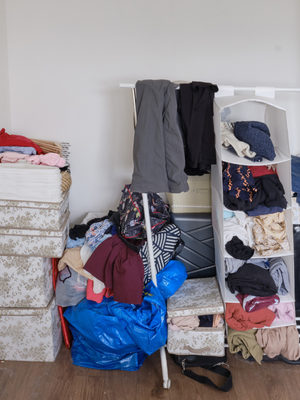
Once I felt good about the design I headed into the store to finalize with an elfa designer. As you can see from the middle picture below, the elfa system made a tremendous difference in the functionality of the space. You will also notice that all of the open shelves became a bit of a dumping ground, mostly because of the remodeling we had been doing.

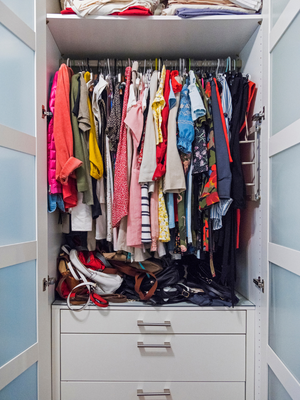
As you see in the third picture, fun and right-fit containers not only make the space pop, but also function better. Making time to measure the shelves for the containers also gave me the time to move all the items that don’t belong in there. Whew, what a difference!

Containers are one of those subjects where we can experience a wild array of emotion about… from excitement to overwhelm, from adoration to contention. If you aren’t sure where to start, please hop over to The Clear & Simple Steps page for guidance. Purchasing containers comes after most of the other steps of the organizing process.

When you get to that step, or want to inspire yourself to get there, purchase Our Favorite Containers eBook!

Entry Closet Before

Entry Closet w/ elfa

Entry Closet After

** The containers I used in our entry closet are all from The Container Store. 

Get All Our Favorite Containers in One Book

A place for everything in your home.

Clear & Simple, SEE IT. MAP IT. DO IT., Marla Dee, Kate Fehr, Our Favorite Containers

Your Guides, Marla Dee & Kate Fehr.

We are passionate about teaching people The Clear & Simple Way to clear clutter and get organized at last.

Clear & Simple®, LLC

© 1999-2025 Clear & Simple, LLC.

All rights reserved.

Simplify Your Kitchen

Would you love to have your kitchen feel fresh and beautiful to gather in?
It’s in the kitchen where the warmth of shared memories,
laughter and life create a recipe that spans generations.
– Yuvraj Kakodiya

The kitchen is the heart of the home. Yet, sadly it can become the dumping ground for paper piles and homeless stuff. And so often there isn’t room on the counter to cook or room on the table to eat. We want your kitchen to be a happy place for family and friends to gather for the holidays.


Use these 3 simple steps to simplify your kitchen:

Step One: Clear your kitchen counter of the paper piles, homeless items or things that don’t even belong in the kitchen.

Step Two: Put fresh flowers or a living plant on your kitchen counter to bring in beauty and prevent clutter from building back up.

Step Three: It can be a blast to clutter clear and organize your junk drawer. One person opens their junk drawer an average of 3 times a day so organizing it can be a great gift to yourself and your family.

You and your family deserve to have a simpler, peaceful and sweet holiday season!

The Holidays are a wonderful time to slow down and focus on simplifying. Check out our Simplify Your Home and Holidays for all of our suggested actions.

If you want support in clutter clearing you can get help at our 30 Day Clutter Clear Out Movement. We’ve created powerful tools you can utilize any time of year to support your journey. If you have some extra time, hop on over there to access these offerings.


simplify kitchen, organize kitchen, home & holidays, organize home
Clear & Simple, SEE IT. MAP IT. DO IT., Simplify Your Home, Simplify Your Holidays

Your Guides to a Simpler Life, Marla Dee & Kate Fehr

We are passionate about teaching The Clear & Simple Way© to transform your life.